fidesys

При работе с конечно-элементными моделями, особенно при создании балок или оболочек, важно убедиться в правильности ориентации сечений и заданных эксцентриситетов. Поэтому в версии 9.1 была реализована возможность прорисовать 3D вид не только для всей модели, но и по отдельности для каждого блока.
Это означает, что вам больше не нужно скрывать или изолировать отдельные элементы. Просто выберите нужный блок и нажмите "Прорисовать 3D вид" – и вы сразу увидите его в 3D.
Для начала необходимо построить модель, для этого в командую строку пропишите вручную команды для построения геометрической модели:
reset
create curve location 0 0 0 location 0 0 1
Curve 1 copy move x 0.5 repeat 3
curve all interval 5
curve all scheme equal
mesh curve all
create material 1 from 'Углеродистая сталь'
set duplicate block elements off
block 1 add curve 1
set duplicate block elements off
block 2 add curve 2
set duplicate block elements off
block 3 add curve 3 4
create beam properties 1
modify beam properties 1 type 'I-Beam'
modify beam properties 1 offsetType 'Centroid'
modify beam properties 1 angle 0.0
modify beam properties 1 added_mass 0.0
modify beam properties 1 ey 0.0
modify beam properties 1 ez 0.0
modify beam properties 1 geom_B1 0.055
modify beam properties 1 geom_B2 0.055
modify beam properties 1 geom_H 0.1
modify beam properties 1 geom_c1 0.0072
modify beam properties 1 geom_c2 0.0072
modify beam properties 1 geom_d 0.0045
modify beam properties 1 mesh_quality 2
modify beam properties 1 warping_dof off
block 1 material 1 cs 1 category beam order 1
block 1 beam properties 1
create beam properties 2
modify beam properties 2 type 'Circle With Offset Hole'
modify beam properties 2 offsetType 'Centroid'
modify beam properties 2 angle 0.0
modify beam properties 2 added_mass 0.0
modify beam properties 2 ey 0.0
modify beam properties 2 ez 0.0
modify beam properties 2 geom_d1 0.1
modify beam properties 2 geom_d2 0.05
modify beam properties 2 geom_e 0
modify beam properties 2 mesh_quality 2
modify beam properties 2 warping_dof off
block 2 material 1 cs 1 category beam order 1
block 2 beam properties 2
create beam properties 3
modify beam properties 3 type 'Hollow Rectangle'
modify beam properties 3 offsetType 'Centroid'
modify beam properties 3 angle 0.0
modify beam properties 3 added_mass 0.0
modify beam properties 3 ey 0.0
modify beam properties 3 ez 0.0
modify beam properties 3 geom_B 0.2
modify beam properties 3 geom_H 0.15
modify beam properties 3 geom_c1 0.0017
modify beam properties 3 geom_c2 0.0018
modify beam properties 3 geom_d1 0.0015
modify beam properties 3 geom_d2 0.0016
modify beam properties 3 mesh_quality 2
modify beam properties 3 warping_dof off
block 3 material 1 cs 1 category beam order 1
block 3 beam properties 3
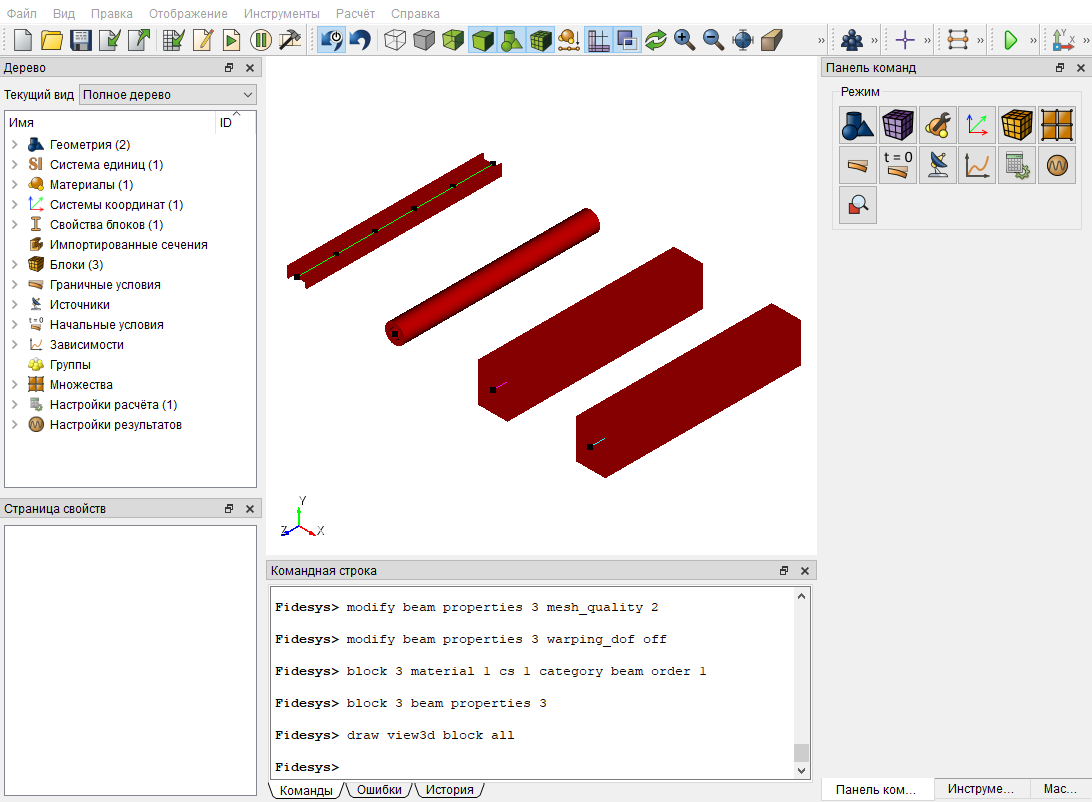
Отображение всей модели в 3D виде:
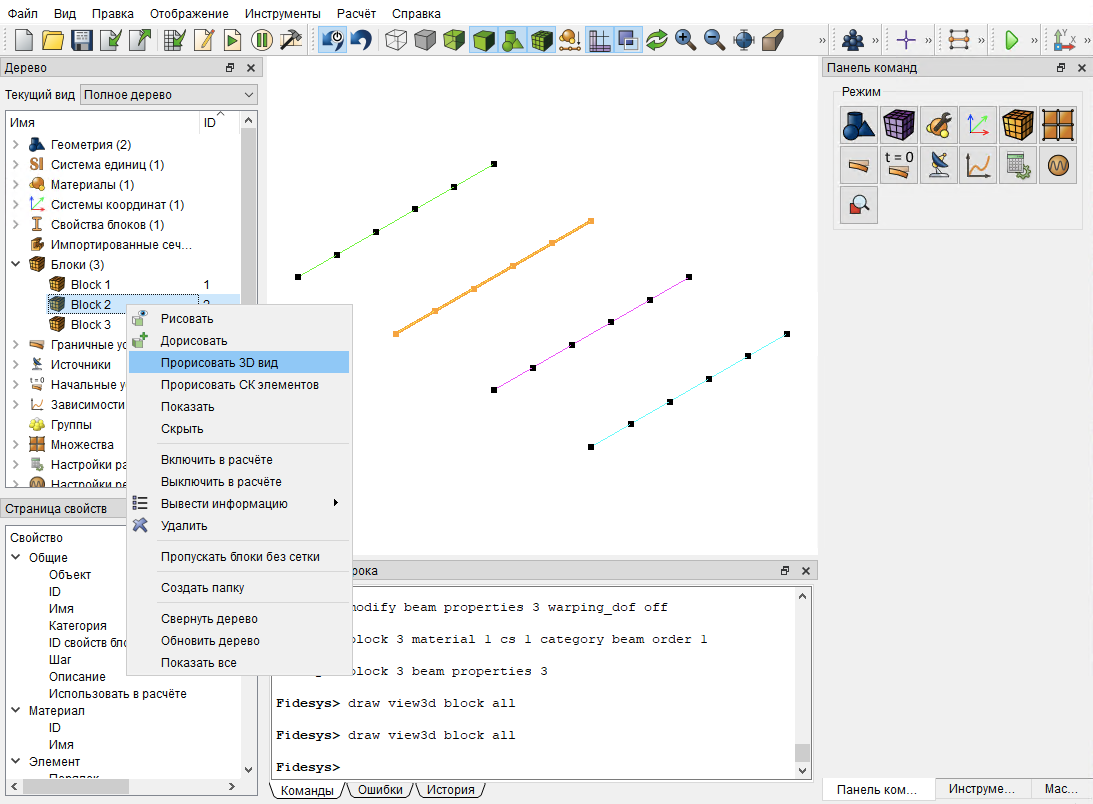
Для того чтобы прорисовать 3D вид не только всей модели, а конкретного блока, в дереве нажмите на нужный блок правой кнопкой мыши, далее в появившемся списке нажмите Прорисовать 3D вид:
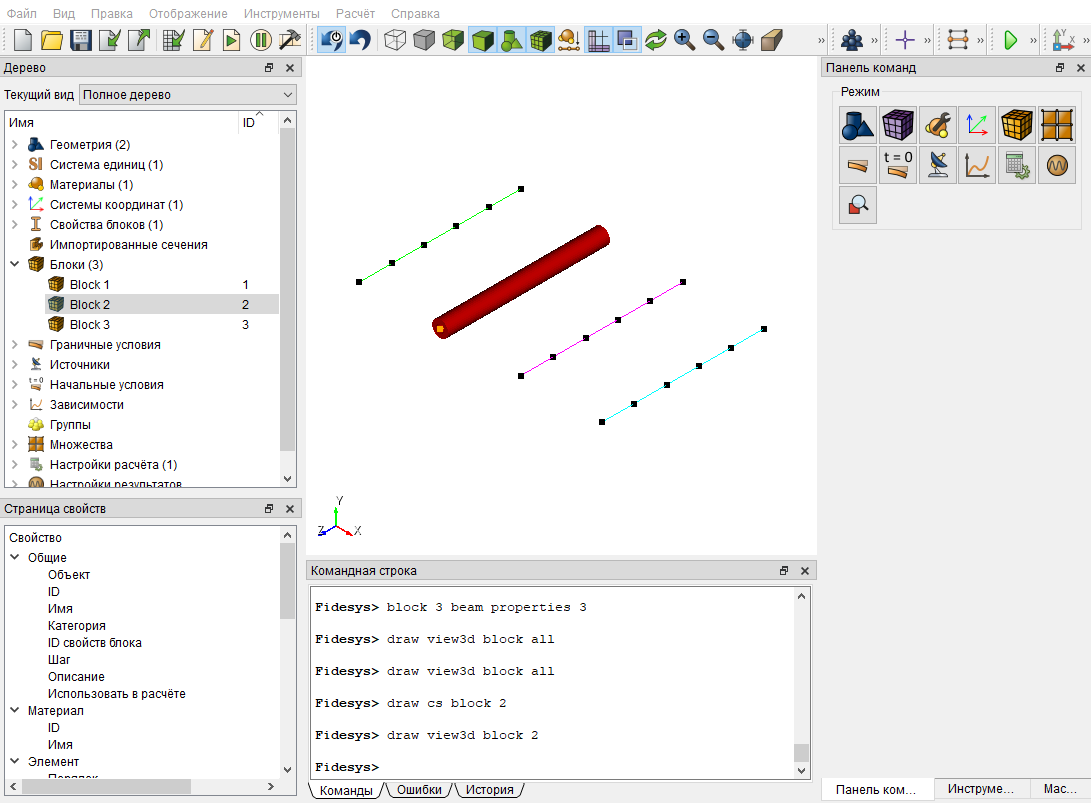
В результате отобразится 3D вид, выбранного блока: